
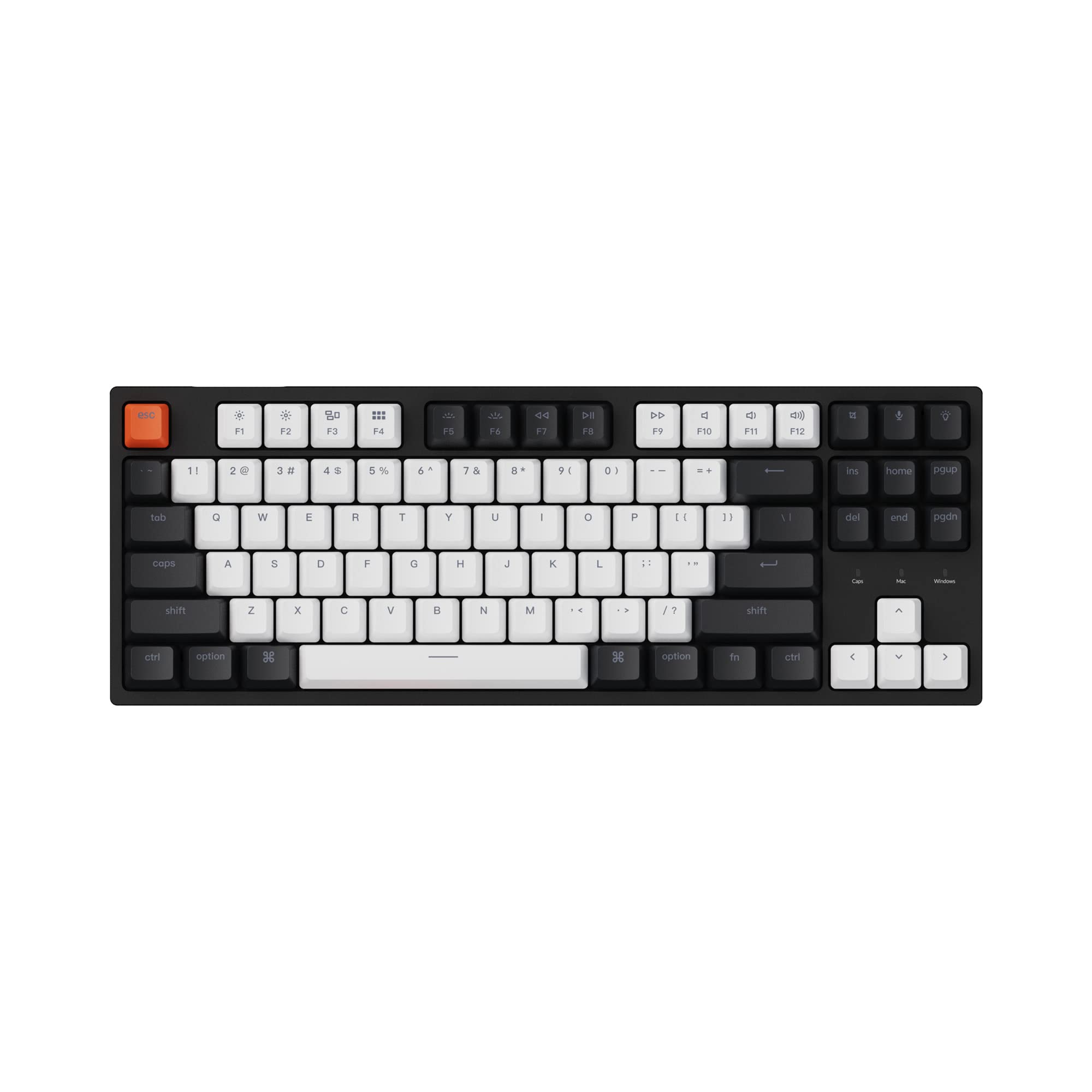
Today I’ll be sharing my thoughts on the Keychron C1 Hot-swappable Wired Mechanical Keyboard with Gateron G Pro Red Switch. I recently got my hands on this keyboard and have been using it for a while. Let’s dive into the Pros and Cons!

Pros and Cons
What We Liked
- Hot-swappable switches: The ability to change switches without soldering is a game-changer. It allows for easy customization of your typing experience.
- Mac compatibility: The Mac layout and extra keycaps for both Mac and Windows operating systems make this keyboard versatile and compatible with different setups.
- Build quality: The Keychron C1 is well-built and feels durable, ensuring it will last for a long time. It’s definitely one of the best prebuilt keyboards under $100 in terms of build quality.
- White LED backlight: The white LED backlight shines through the double-shot ABS keycaps beautifully, and you can choose from different lighting styles to suit your mood.
- Customizable typing experience: With the hot-swappable socket switch, you can easily swap out different mechanical switches to find your preferred typing feel.
What Can Be Improved
- Quality control: There have been some reports of certain keys not working or breaking after a short period of use. Improved quality control could address these issues.
- Visibility of keycap legends: The manufacturing process of the black keycaps makes it difficult to view the F1-F12 keycap names, especially in low light conditions.
Quick Verdict
The Keychron C1 Hot-swappable Wired Mechanical Keyboard offers a unique and customizable typing experience. With its hot-swappable switches, Mac compatibility, and solid build quality, it’s a great option for those looking for a versatile keyboard under $100. The white LED backlight adds a touch of elegance and the ability to customize the lighting style is a nice bonus. However, it is worth noting that there have been some reports of quality control issues, so it’s essential to keep an eye on that. Overall, if you’re in the market for a reliable and customizable keyboard, the Keychron C1 is definitely worth considering.
You can find more information about the Keychron C1 Hot-swappable Wired Mechanical Keyboard here.
Unboxing – What’s Inside?
I recently purchased the Keychron C1 Hot-swappable Wired Mechanical Keyboard with Gateron G Pro Red Switch/Double-Shot ABS Keycaps/White Backlight/USB Type-C Cable, Tenkeyless 87 Keys Computer Keyboard for Mac Windows PC Hot-swap Gateron G Pro Red Switch on Amazon. Being a gaming enthusiast, I was attracted to its backlit feature and compatibility with various operating systems. I received the product within a week of placing the order, and the delivery was swift.
Inside the box, I found:
- The Keychron C1 Hot-swappable Wired Mechanical Keyboard
- USB Type-C Cable
- User Guide (Documentation)
Specifications
The specifications of the Keychron C1 Hot-swappable Wired Mechanical Keyboard are as follows:
- Style: Classic
- Keyboard backlighting color support: Single Color
- Number of Keys: 87
- Operating System: Windows/Android/Mac/iOS
- Color: Hot-swap Gateron G Pro Red Switch
- Special Feature: Backlit
- Keyboard Description: Gaming
- Connectivity Technology: Type-C cable
- Compatible Devices: Laptop, PC
- Brand: Keychron
- Date First Available: July 9, 2020
- Manufacturer: Keychron
- Item Weight: 2.4 pounds
- Package Dimensions: 15.08 x 7.13 x 2.17 inches
Documentation/ User Guide
The user guide provided with the Keychron C1 Hot-swappable Wired Mechanical Keyboard was extremely helpful. It provided detailed instructions on how to customize the backlighting color and use the hot-swappable feature to change the switches. The guide also included troubleshooting tips and additional features of the keyboard. You can find the user guide here.
Features – What We Found
Tenkeyless Design for Maximum Productivity
The Keychron C1 features a tenkeyless (87 keys) design, making it compact and portable while still providing all the necessary keys for a productive typing experience. With its hot-swappable feature, you can customize the typing experience by easily switching out the Gateron G Pro Red switches without the need for soldering. This allows you to find the perfect switch for your typing style and maximize your productivity.
Pro-tip: Experiment with different switch types to find the one that suits your typing preferences. You can try out Gateron, Cherry, Kailh, and other compatible switches available on the market.
Mac and Windows Compatibility
The Keychron C1 is designed to be compatible with both Mac and Windows operating systems. It features a unique Mac layout with all the necessary multimedia and function keys, making it perfect for Mac users. Additionally, the keyboard comes with extra keycaps for both Mac and Windows, allowing you to easily switch between operating systems.
For more information and to purchase the Keychron C1, visit Amazon.com.
Customizable White LED Backlight
Designed with double-shot ABS keycaps, the Keychron C1 allows the charming white LED backlight to shine through the legends with a subtle feeling. The keyboard offers different backlight styles, including flashing, breathing, or static white, allowing you to customize the lighting to match your mood and preference. The backlight adds a stylish touch to the keyboard, making it visually appealing.
Reliable Connection and Comfortable Typing
The Keychron C1 features a USB Type-C wired connection with a detachable cable, ensuring a constant power supply and reliable connection to your laptop or PC. The inclined bottom frame and two-level adjustable feet provide a comfortable typing angle, allowing you to type for extended periods without discomfort.
Pro-tip: Adjust the feet of the keyboard to find the optimal typing angle that suits your comfort and reduces strain on your wrists.
Durable and Responsive Gateron G Pro Red Switches
The Keychron C1 comes pre-installed with Gateron G Pro Red switches, known for their unrivaled linear responsiveness and durability. With a lifespan of 50 million keystrokes, these switches are built to last. The keyboard’s hot-swappable socket switch is compatible with almost all MX-style 3-pin and 5-pin mechanical switches on the market, including Gateron, Cherry, Kailh, and more.
Explaining the science behind the feature 5: Gateron G Pro Red switches are built with precise mechanisms that ensure smooth and consistent keystrokes. The linear switch design provides a consistent force from top to bottom, resulting in a seamless typing experience.
Final Thoughts
Our Score: 95.0
I recently purchased the Keychron C1 Hot-swappable Wired Mechanical Keyboard and I have been extremely satisfied with my purchase. The build quality of this keyboard is top-notch, and it feels very solid and sturdy. The hot-swappable feature allows for easy customization of the typing experience without the need for soldering. Plus, the Gateron G Pro Red switches provide a smooth and responsive typing experience.
The Mac layout of the keyboard is perfect for my needs, as it includes all the necessary multimedia and function keys while still being compatible with Windows. The double-shot ABS keycaps not only look great but also allow the white LED backlight to shine through the legends, creating a subtle and pleasant glow. The backlight offers different styles to match your mood, whether it’s flashing, breathing, or static white.
Overall, I highly recommend the Keychron C1 Hot-swappable Wired Mechanical Keyboard. It offers incredible value for the price, surpassing even more expensive keyboards in terms of quality and performance. If you’re looking for a reliable and customizable keyboard for Mac or Windows, this is the perfect choice. Click here to check it out on Amazon.
Alternatives To Go For
If you’re considering the Keychron C1 Hot-swappable Wired Mechanical Keyboard, let me suggest some alternative products that might catch your interest.
- First, we have the Logitech MX Master 3S, a wireless performance mouse that offers an ergonomic design and a wide range of features. With a high DPI and the ability to track on glass surfaces, this mouse is perfect for both work and leisure. Plus, it comes with a free Adobe Creative Cloud subscription, making it an excellent choice for creative professionals.
- Another great option is the Logitech G502 HERO High Performance Wired Gaming Mouse. This mouse is engineered for gamers with its customizable features, high DPI, and 11 programmable buttons. With on-board memory, you can easily save your settings and take them with you wherever you go. Whether you’re a casual gamer or a pro, this mouse will exceed your expectations.
- If you’re looking for a wireless gaming mouse, the Logitech G305 LIGHTSPEED is worth considering. With its Hero 12K sensor, this mouse offers exceptional accuracy and precision. It also has a lightweight design, programmable buttons, and an impressive battery life of up to 250 hours. Whether you’re a hardcore gamer or a casual player, this mouse will enhance your gaming experience.
- If none of the above options appeal to you, there are plenty of other great products available on the market. Take your time to explore and compare different brands and models to find the perfect fit for your needs. Remember, it’s important to consider factors such as comfort, functionality, and your specific requirements when making a purchase decision.
You can find more details about the Logitech MX Master 3S here.
Interested in the Logitech G502 HERO? Get more information here.
Find out more about the Logitech G305 LIGHTSPEED here.
By exploring these alternatives, you’ll be able to find the perfect peripheral device to complement your setup. Whether you’re a professional, a gamer, or simply someone who values efficiency and convenience, these alternative products offer a range of features and capabilities to enhance your overall user experience.