
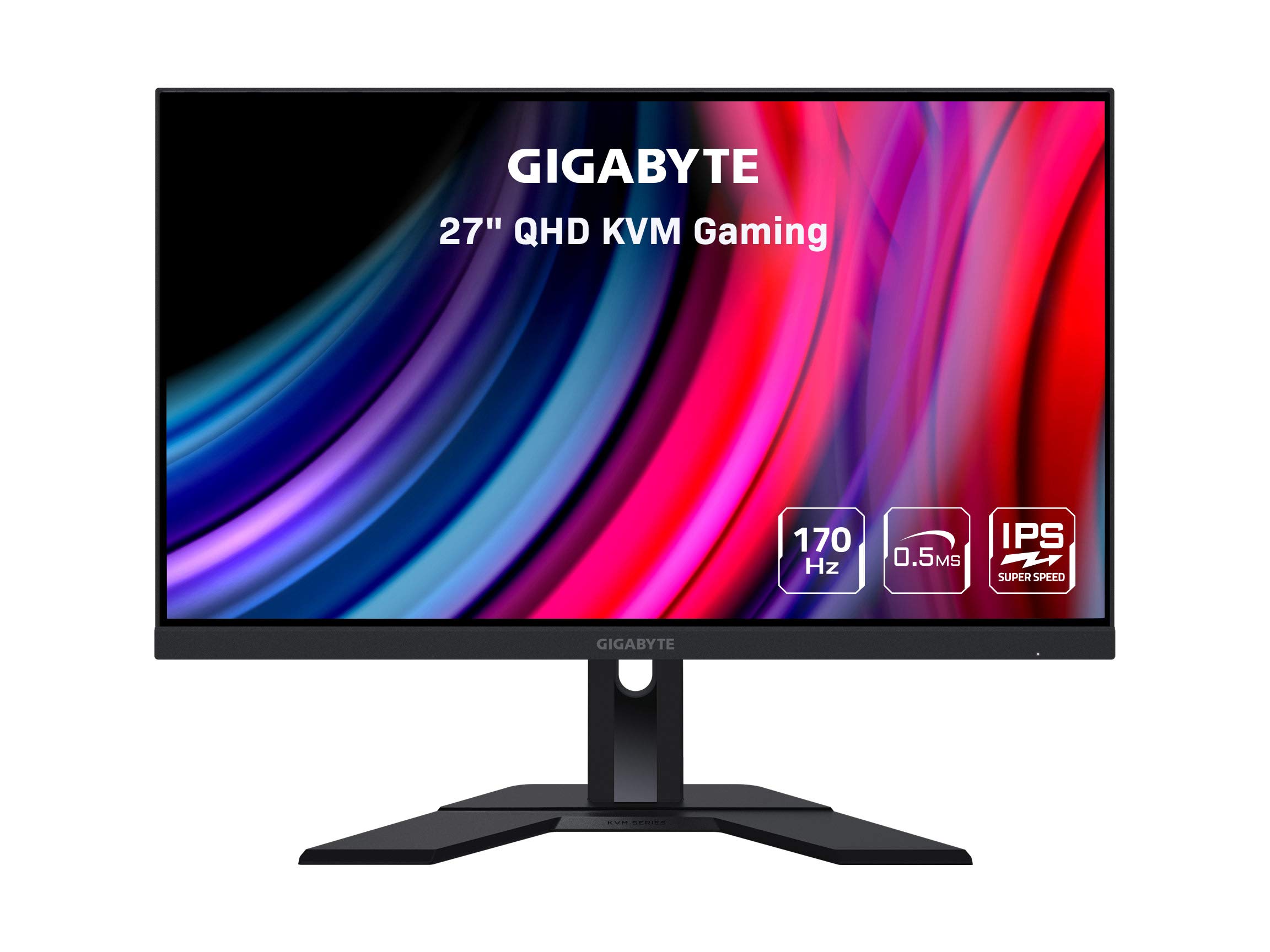
The GIGABYTE M27Q 27 170Hz 1440P -KVM Gaming Monitor is a fantastic monitor for gaming and productivity purposes. It offers a high refresh rate of 170Hz and a 0.5ms response time, providing smooth and responsive gameplay. The 27-inch 2560×1440 SS IPS display delivers crisp and vibrant visuals, while the 92% DCI-P3 color gamut ensures accurate and vivid colors. The monitor is also HDR ready, further enhancing the visual experience.
One of the standout features of this monitor is the KVM (Keyboard, Video, Mouse) switch, which allows you to control multiple devices using a single set of keyboard and mouse. This is incredibly convenient for seamlessly switching between different devices without the hassle of connecting and disconnecting peripherals. The KVM functionality is a game-changer for productivity and multitasking.
The GIGABYTE M27Q also comes with various ergonomic features, such as tilt and height adjustments, allowing you to find the optimal viewing position for comfort. The monitor is VESA wall mount compatible, providing flexible placement options. It also has low blue light and flicker-free technology, reducing eye strain during extended use.
While the monitor offers excellent features and performance, there are a few drawbacks to consider. Some users have reported IPS glow, which is light bleed from the corners of the panel. While this may not be noticeable in regular usage, it can become apparent when watching movies in the dark. Additionally, some users have experienced quality control issues, such as misaligned parts and firmware problems. These issues indicate lower standards for quality control, and it’s important to consider them before making a purchase.
In conclusion, the GIGABYTE M27Q 27 170Hz 1440P -KVM Gaming Monitor is a great option for gamers and professionals looking for a high-quality display. Its high refresh rate, accurate colors, and KVM functionality make it a versatile and convenient choice. However, potential buyers should be aware of the possible IPS glow and quality control issues. Overall, this monitor offers excellent value for its features and performance.

Pros and Cons
What We Liked
- High refresh rate and low response time for smooth gameplay
- Vibrant and accurate colors with the HDR ready display
- Convenient KVM switch for controlling multiple devices with a single set of peripherals
- Ergonomic design with tilt and height adjustments for optimal viewing comfort
- Low blue light and flicker-free technology for reduced eye strain
What Can Be Improved
- Some users have reported IPS glow, which can be noticeable in dark scenes
- Quality control issues, such as misaligned parts and firmware problems, have been reported
Quick Verdict
The GIGABYTE M27Q 27 170Hz 1440P -KVM Gaming Monitor is a highly recommended option for gamers and professionals seeking a high-quality display. It offers a smooth and responsive gaming experience with its high refresh rate and low response time. The vibrant and accurate colors, along with HDR readiness, enhance the visual experience. The inclusion of a KVM switch is a standout feature, providing convenience and seamless device control. While there have been reports of IPS glow and quality control issues, the overall value and performance of this monitor make it a worthy investment for gaming and productivity needs.
Check out the GIGABYTE M27Q 27 170Hz 1440P -KVM Gaming Monitor on Amazon
Unboxing – What’s Inside?
I recently purchased the GIGABYTE M27Q 27 170Hz 1440P -KVM Gaming Monitor from Amazon. Living in the USA, I ordered it online and it was delivered to me quite quickly.
Inside the box, I found the following items:
- Power cable
- HDMI cable
- DP cable
- USB cable
- QSG (Quick Start Guide)
- Warranty card
Specifications
Here are the specifications of the GIGABYTE M27Q 27 170Hz 1440P -KVM Gaming Monitor:
- Brand: Gigabyte
- Display Resolution Maximum: 2560 x 1440 Pixels
- Screen Size: 27 Inches
- Manufacturer: GIGABYTE
- Voltage: 19 Volts
- Color: M Series
- Item Dimensions LxWxH: 7.9 x 28.3 x 18.5 inches
- Product Dimensions: 7.9 x 28.3 x 18.5 inches
- Item Weight: 8.8 pounds
- Item model number: M27Q-SA
- Series: M27Q-SA
- Number of USB 3.0 Ports: 2
- Max Screen Resolution: 2560 x 1440 Pixels
- Screen Resolution: 2560×1440
- Standing screen display size: 27 Inches
Documentation/ User Guide
The provided documentation, including the User Guide, proved to be quite helpful in setting up and understanding the features of the GIGABYTE M27Q 27 170Hz 1440P -KVM Gaming Monitor.
You can find the User Guide here.
Features – What We Found
-
0.5ms (MPRT) Response Time
The GIGABYTE M27Q gaming monitor features an impressive 0.5ms (MPRT) response time, ensuring fast and smooth gameplay. This means that the monitor can quickly transition from one frame to another, minimizing motion blur and ghosting. Whether you are playing fast-paced action games or competitive eSports titles, the low response time of this monitor ensures that you can react quickly to on-screen events.
A pro-tip for gamers is to enable the overdrive feature in the monitor’s settings. This feature further reduces the response time and enhances the clarity of fast-moving images. With its swift response time, the GIGABYTE M27Q provides an immersive gaming experience with minimal input lag.
Product Link: GIGABYTE M27Q Gaming Monitor
-
AMD FreeSync Premium
The GIGABYTE M27Q gaming monitor is equipped with AMD FreeSync Premium technology, which eliminates screen tearing and stuttering for a smoother and more seamless gaming experience. By synchronizing the monitor’s refresh rate with the graphics card’s frame rate, FreeSync Premium ensures that every frame is displayed without any disruptions. This is especially beneficial during fast-paced action scenes, allowing for fluid gameplay.
With FreeSync Premium, gamers can enjoy a tear-free and lag-free gaming experience, giving them a competitive edge in multiplayer games where every millisecond counts. The GIGABYTE M27Q supports a wide range of refresh rates, allowing for smooth gaming from 48Hz to 170Hz.
Product Link: GIGABYTE M27Q Gaming Monitor
-
KVM (Keyboard, Video, and Mouse) Switch
The GIGABYTE M27Q features a convenient KVM switch that allows you to control multiple devices using a single keyboard, video, and mouse setup. This feature is especially useful for those who use multiple computers or gaming consoles and want to streamline their workspace. With the KVM switch, you can easily switch between devices without the need for additional cables or hardware.
Whether you are working on a project with multiple computers or gaming on different consoles, the KVM switch simplifies the process by eliminating the need for multiple peripherals. This enhances productivity and saves desk space, providing a clutter-free setup.
Product Link: GIGABYTE M27Q Gaming Monitor
-
VESA Display HDR400 and 92% DCI-P3 Color Gamut
The GIGABYTE M27Q is equipped with VESA Display HDR400 technology, offering enhanced visual quality and a wider color range. HDR (High Dynamic Range) enables the monitor to display a greater level of brightness and contrast, resulting in more lifelike and vibrant images. HDR400 certification ensures that the monitor meets the specific requirements for this standard.
In addition, the monitor boasts a 92% DCI-P3 color gamut, exceeding the sRGB color space. This allows for a wider range of colors, providing more accurate and vivid representation of images and videos. Whether you are watching movies, editing photos, or playing games, the GIGABYTE M27Q’s color gamut ensures stunning visuals.
Product Link: GIGABYTE M27Q Gaming Monitor
-
Ergonomic Design with Tilt and Height Adjustments
The GIGABYTE M27Q gaming monitor features an ergonomic design that prioritizes your comfort during extended gaming or work sessions. It offers both tilt and height adjustments, allowing you to find the perfect viewing position for your needs.
With the ability to tilt the monitor from -5° to +20° and adjust its height, you can easily align the screen to your eye level, reducing strain on your neck and back. This ergonomic design promotes a healthier posture and ensures a more enjoyable and comfortable viewing experience.
Product Link: GIGABYTE M27Q Gaming Monitor
Review and Scores
Our Score: 85.0
I recently purchased the GIGABYTE M27Q 27 170Hz 1440P -KVM Gaming Monitor and I have been extremely satisfied with its performance. The 2560 x 1440 SS IPS display provides stunning visuals with vibrant colors and sharp details. The 170Hz refresh rate and 0.5ms response time ensure smooth gameplay without any noticeable lag or ghosting.
One of the standout features of this monitor is the built-in KVM switch. It allows me to easily switch between multiple devices without the hassle of swapping cables. I can connect my laptop, desktop PC, and gaming console all at once and seamlessly switch between them with just a push of a button. This feature has greatly improved my productivity and convenience.
Additionally, the monitor’s HDR readiness and FreeSync Premium technology further enhance the visual experience. HDR delivers more lifelike colors and improved contrast, while FreeSync eliminates screen tearing and stuttering, providing a seamless gaming experience. The ergonomic design with tilt and height adjustments allows me to find the perfect viewing angle and the VESA wall mount compatibility adds versatility to the setup.
I highly recommend the GIGABYTE M27Q 27 170Hz 1440P -KVM Gaming Monitor. It offers incredible performance, convenient features, and excellent value for the price. If you’re looking for a high-quality monitor for gaming or productivity, this is a great choice. Check it out here!
Best combination

If you’re looking to take your gaming experience to the next level, I highly recommend considering the GIGABYTE M27Q 27 170Hz 1440P -KVM Gaming Monitor as an additional purchase to complement your main product, the SAMSUNG 980 PRO SSD 2TB PCIe NVMe Gen 4 Gaming M.2 Internal Solid State Drive Memory Card.
The GIGABYTE M27Q monitor boasts impressive features that will enhance your gameplay. Its 2560 x 1440 SS IPS display provides stunning visuals with vibrant colors and sharp details. With a 0.5ms (MPRT) response time, you can enjoy smooth and blur-free motion, ensuring you never miss a moment during intense gaming sessions. The monitor also supports HDR, delivering a more immersive and lifelike visual experience.
Furthermore, the GIGABYTE M27Q offers a fast 170Hz refresh rate, allowing for incredibly smooth gameplay with reduced motion blur. The FreeSync Premium technology ensures tear-free and stutter-free gaming, providing a competitive edge in fast-paced games. With 92% DCI-P3 color gamut coverage, you’ll enjoy accurate and vibrant colors that bring your games to life.
The monitor also features a KVM (Keyboard, Video, Mouse) switch, which allows you to easily switch between multiple devices using a single set of peripherals. This feature is particularly useful if you have multiple gaming consoles or computers.
To take advantage of this fantastic offer, you can purchase the GIGABYTE M27Q 27 170Hz 1440P -KVM Gaming Monitor on Amazon. By combining the SAMSUNG 980 PRO SSD and the GIGABYTE M27Q monitor, you’ll have a powerful gaming setup that delivers maximum speed, stunning visuals, and an immersive gaming experience.
Other Options To Consider
When it comes to gaming monitors, the GIGABYTE M27Q 27 170Hz 1440P -KVM Gaming Monitor is undoubtedly a great choice. However, if you’re looking for some alternatives that offer similar features and performance, here are some options worth considering:
- GIGABYTE M27Q 27 170Hz 1440P -KVM Gaming Monitor: This monitor offers a stunning 2560 x 1440 SS IPS display with a high refresh rate of 170Hz. With a response time of just 0.5ms (MPRT), it ensures smooth and lag-free gaming. Additionally, it supports HDR and comes with AMD FreeSync Premium technology, providing a more immersive gaming experience. You can find more details about this monitor here.
- LG 27GP850-B Ultragear Gaming Monitor: If you’re a fan of Nano IPS displays, this monitor is worth considering. It offers a 27 QHD (2560 x 1440) display with a 1ms response time and a high refresh rate of 165Hz. It is NVIDIA G-SYNC compatible and also supports AMD FreeSync Premium, ensuring smooth and tear-free gameplay. The height, tilt, and pivot adjustable stand provide flexibility for the perfect viewing angle. Check it out here.
- LG UltraGear QHD 27-Inch Gaming Monitor 27GL83A-B: This monitor offers an IPS display with a lightning-fast 1ms (GtG) response time and a 144Hz refresh rate. It is HDR 10 compatible and supports both NVIDIA G-SYNC and AMD FreeSync technologies, ensuring smooth and stutter-free gaming. If you’re interested, you can find more information here.
- LG UltraGear QHD 27-Inch Gaming Monitor 27GL850-B: For gamers who prioritize color accuracy, this monitor is a great pick. It features a Nano IPS display with a 1ms (GtG) response time and a 144Hz refresh rate. With HDR 10 compatibility and support for NVIDIA G-SYNC, you can expect vibrant visuals and tear-free gaming. Explore more about this monitor here.
- Empty: Unfortunately, there is no alternative product provided for the fifth option. However, feel free to check out the other suggested alternatives to find the perfect gaming monitor for your needs.
These alternative gaming monitors offer comparable features and performance to the GIGABYTE M27Q. Consider your specific requirements and budget to make the best decision. Whether you choose the GIGABYTE M27Q or one of these alternatives, you can expect an enhanced gaming experience with high-quality visuals and smooth gameplay.