
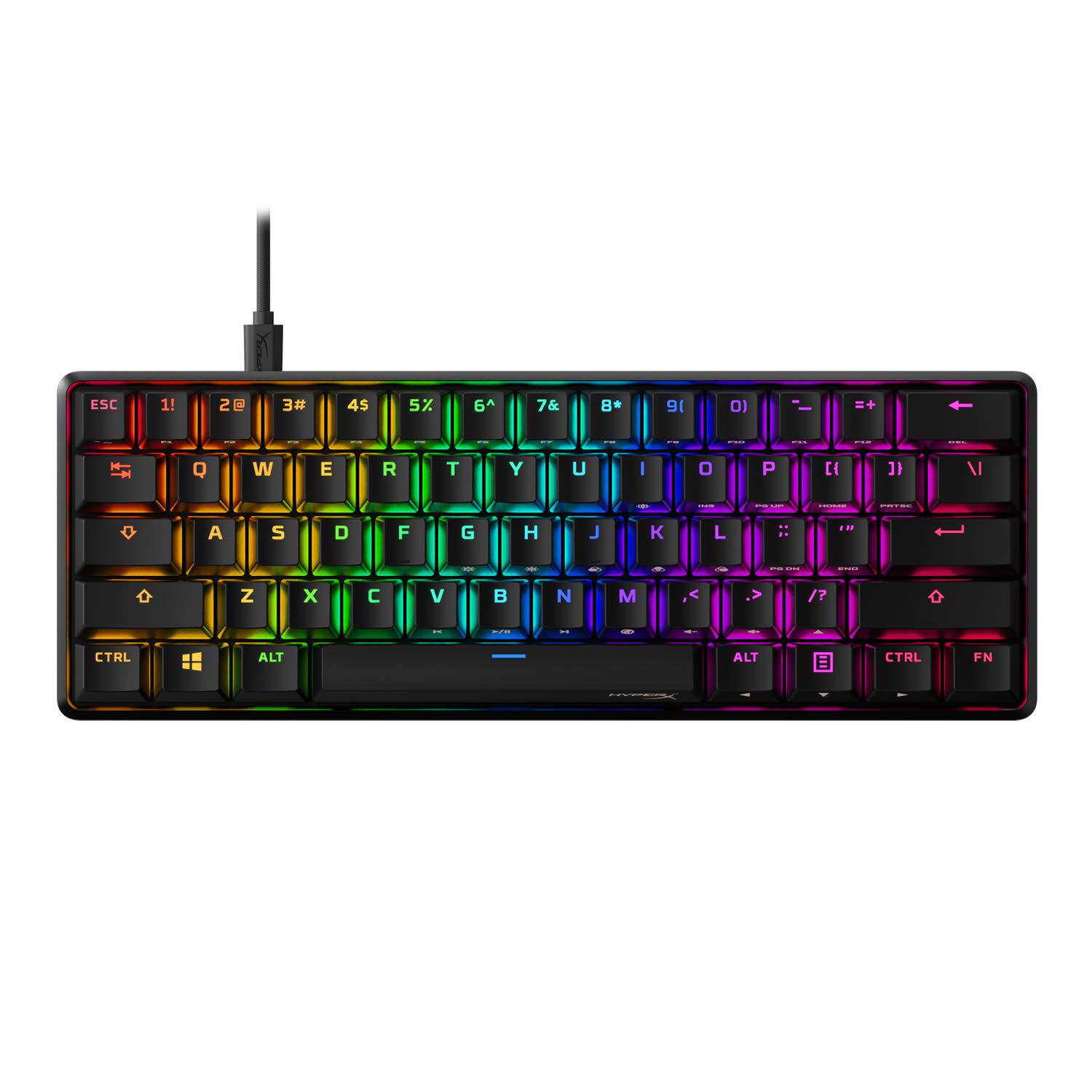
So, I recently had the chance to try out the HyperX Alloy Origins 60 – Mechanical Gaming Keyboard, and I must say, I was quite impressed. This compact gaming keyboard offers a whole lot of features and a great user experience. Let me dive into the details.

Pros and Cons
What We Liked
- Petite 60% form factor: The compact size of this keyboard allows for more desk space for your mouse, which is a huge plus.
- Full aircraft-grade aluminum body: The solid aluminum casing not only looks sleek but also provides durability and stability, especially during intense gaming sessions.
- Double shot PBT keycaps with side printing: The keycaps are made of durable PBT material, resistant to wear and solvents. The side printing of secondary functions allows for quick recognition.
- HyperX Mechanical switches: The custom-designed HyperX key switches are not only balanced for speed and accuracy but also incredibly reliable, rated for 80 million keypresses without losing quality.
- RGB backlit keys with radiant lighting effects: The exposed LED design of the HyperX mechanical switches delivers bright and vibrant RGB lighting that truly enhances your gaming experience.
What Can Be Improved
- Stabilizers: Some users have reported that the stabilizers on this keyboard have more lateral play than desired, leading to wobbly keys. This could be improved in future iterations.
- Non-hotswappable: While personal preference may vary, the inability to swap out the keys or make custom modifications might disappoint those who enjoy tinkering with their keyboards.
Quick Verdict
The HyperX Alloy Origins 60 is a fantastic mechanical gaming keyboard that excels in compactness, durability, and performance. With its solid aluminum body, reliable HyperX switches, and vibrant RGB lighting, it offers a great gaming experience. While there are some minor drawbacks such as the stabilizers and the lack of hotswappability, the overall package is impressive. If you’re in the market for an ultra-compact gaming keyboard, the HyperX Alloy Origins 60 is definitely worth considering.
Unboxing – What’s Inside?
I recently purchased the HyperX Alloy Origins 60 – Mechanical Gaming Keyboard from Amazon. Being a gamer, I was in need of a compact and high-performance keyboard, and this product seemed to fit the bill perfectly. I placed my order and eagerly waited for the delivery. It arrived in just a couple of days, which was impressively fast.
As I unboxed the HyperX Alloy Origins 60, I was greeted with a sleek and stylish keyboard. Inside the box, I found the following:
- HyperX Alloy Origins 60 – Mechanical Gaming Keyboard
- Detachable USB Type-C cable
- Keycap removal tool
Specifications
The HyperX Alloy Origins 60 – Mechanical Gaming Keyboard boasts the following specifications:
- Style: HyperX Red
- Keyboard backlighting color support: RGB
- Number of Keys: 61
- Operating System: Windows 10, 8.1, 8, 7
- Color: Black
- Special Feature: Portable, Backlit, Lighting
- Keyboard Description: Gaming
- Connectivity Technology: Bluetooth
- Compatible Devices: Gaming Console, PC
- Brand: HyperX
Documentations
The product did not include any user guide or documentation. However, I was able to find the necessary information and instructions on the official HyperX website. The website provided a comprehensive user guide that helped me understand the keyboard’s features and customization options. You can find the user guide here.
Features – What We Found
Ultra Compact 60% Form Factor
The HyperX Alloy Origins 60 features a compact 60% form factor design that frees up more surface area on your desk for your mouse. This makes it ideal for gamers who prefer a minimalist setup or need extra room for mouse movements during intense gaming sessions. Despite its smaller size, the keyboard still provides all the essential keys you need for gaming and typing.
The petite form factor also makes the keyboard highly portable, allowing you to easily pack it in your bag and take it with you wherever you go. Whether you’re gaming at a friend’s house or participating in a gaming tournament, the compact design ensures you can always bring your preferred keyboard along.
Pro-tip: To maximize desk space even further, consider using a keyboard wrist rest. This will not only provide comfort during long gaming sessions but also create additional clearance for your keyboard and mouse.
Aircraft-Grade Aluminum Body
The HyperX Alloy Origins 60 boasts a full aircraft-grade aluminum body, offering exceptional durability and stability. The aluminum casing keeps the keyboard structurally sound even during intense gaming moments, ensuring it can withstand the rigors of competitive gaming.
The sturdy construction of the keyboard also adds to its premium look and feel, giving it a professional aesthetic that complements any gaming setup. This makes it an ideal choice for gamers who value both performance and style.
Check out the HyperX Alloy Origins 60 on Amazon to see its sleek aircraft-grade aluminum body for yourself.
Double Shot PBT Keycaps with Side Printing
The keycaps on the HyperX Alloy Origins 60 are made of double shot PBT material. This high-quality material is known for its durability, resistance to wear, friction, and solvents. It ensures that the keycaps can withstand the test of time, even during long gaming sessions with intense keypresses.
Additionally, the keycaps feature side printing of secondary functions. This means that the alternate functions of the keys are printed on the sides, allowing for quick recognition and easy access to secondary functions. This is especially convenient for gamers who use a wide range of macros and shortcuts during gameplay.
The double shot PBT keycaps with side printing not only provide a superior typing and gaming experience but also enhance the overall aesthetics of the keyboard, giving it a sleek and sophisticated look.
HyperX Mechanical Switches
The HyperX Alloy Origins 60 is equipped with custom-designed HyperX key switches that are specifically balanced for speed and accuracy. These switches provide a satisfying tactile feedback and actuation force that is optimized for gaming and typing.
Furthermore, these mechanical switches are highly reliable and durable, rated for up to 80 million keypresses without any loss of quality. This ensures that the keyboard will continue to perform at its best even with extensive use over an extended period of time.
If responsive and precise keystrokes are crucial to your gaming performance, the HyperX Alloy Origins 60 with its premium HyperX mechanical switches is an excellent choice.
RGB Backlit Keys with Radiant Lighting Effects
The HyperX Alloy Origins 60 features RGB backlit keys with radiant lighting effects. The exposed LED design of the HyperX mechanical switches allows for brighter and more luminous RGB lighting, enhancing your gaming experience and adding flair to your setup.
The keyboard offers a wide range of customizable lighting options through the HyperX NGENUITY software. You can set up per-key lighting and effects, create dynamic lighting patterns, and synchronize the lighting with other HyperX RGB devices for a cohesive and immersive lighting setup.
Whether you prefer a subtle and elegant backlight or a vibrant and eye-catching light show, the RGB backlighting on the HyperX Alloy Origins 60 allows you to personalize your gaming keyboard according to your unique style and preference.
Our Review, Score and More
Our Score: 93.0
I recently purchased the HyperX Alloy Origins 60 mechanical gaming keyboard and I must say, I’m really impressed. The petite 60% form factor is a great feature as it frees up more room for my mouse. The full aircraft-grade aluminum body adds to the overall quality and stability of the keyboard, even during intense gaming sessions. The double shot PBT keycaps with side printing are durable and resistant to wear, while the secondary functions printed on the sides of the keycaps make them easy to recognize.
The HyperX Mechanical switches are custom-designed for speed and accuracy, and they feel buttery smooth. The RGB backlit keys with radiant lighting effects are bright and vibrant, and the exposed LED design of the switches enhances the overall lighting experience. The advanced customization options with HyperX NGENUITY allow me to customize Game mode, build macros, and set up per-key lighting and effects according to my preference.
One minor drawback I found is that the stabilizers can be a bit loose and rattly, but I was able to improve the stability by following a YouTube tutorial on a bandaid mod. Overall, after trying several other competitors, I find the HyperX Alloy Origins 60 to be the best choice for its impressive features and high-quality construction. I highly recommend it to other gamers and enthusiasts.