
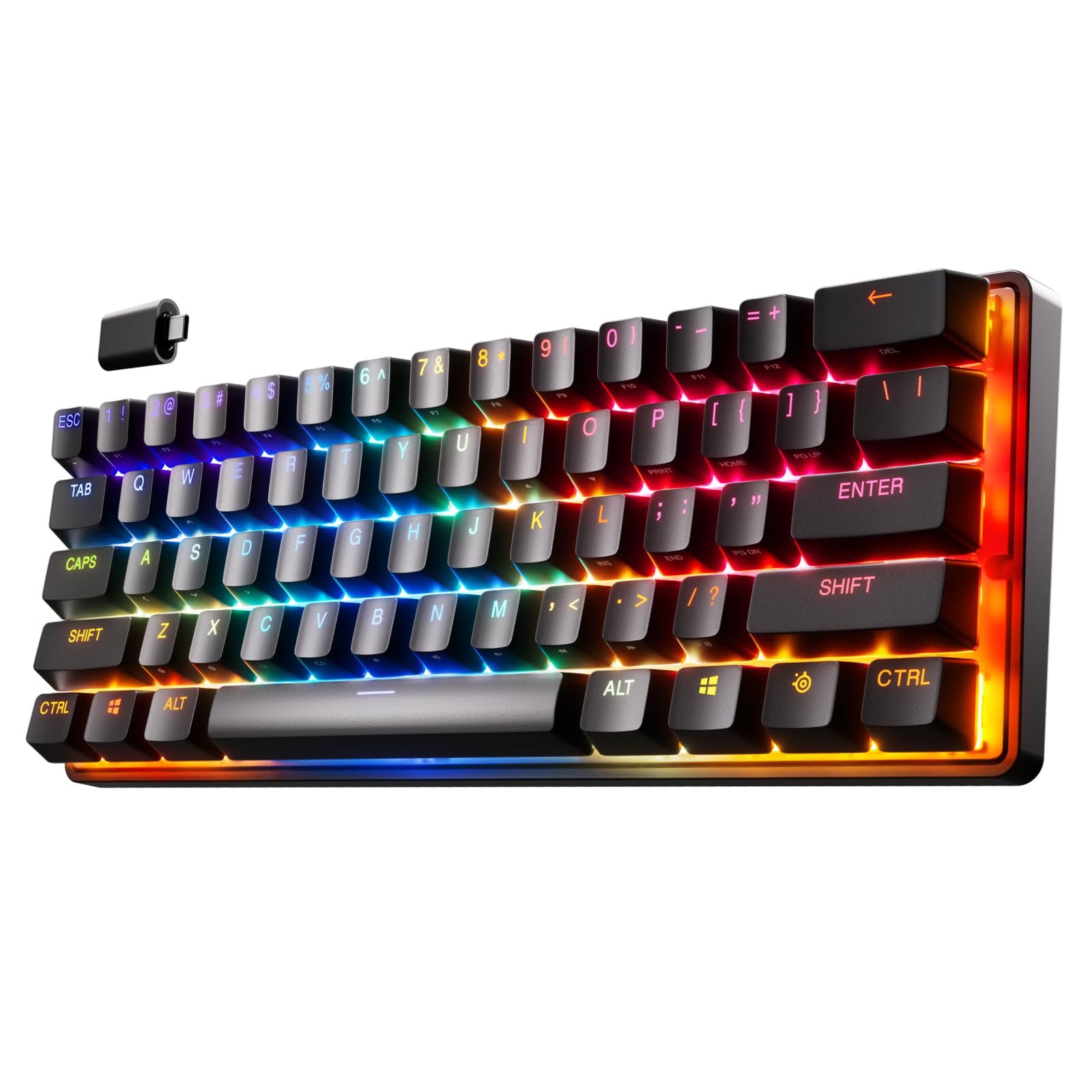
Today I’m going to share my thoughts on the SteelSeries Apex Pro Mini Wireless HyperMagnetic Gaming Keyboard. As someone who has used a variety of keyboards for both gaming and typing, I was excited to try out this compact 60% form factor keyboard.

Pros and Cons
What We Liked
- Fully customizable & stupidly fast: The OmniPoint 2.0 Adjustable HyperMagnetic switches provide a high level of customization and incredibly fast actuation, making it ideal for both gaming and typing.
- Rapid Trigger: The dynamic activation and deactivation of keys based on travel distance minimizes latency and ensures quick and accurate key inputs.
- Ultimate control: The 40 levels of per-key actuation allow for precise control, whether youneed light, ultra-fast movements or deep presses for special actions.
- 2-in-1 action keys: You can program two different actions to the same key, providing flexibility in your gameplay.
- Lag-free wireless connection: The Quantum 2.0 Dual Wireless technology ensures a lag-free experience with both the 2.4GHz connection and Bluetooth 5.0.
What Can Be Improved
- Keyboard layout: Some users may find the key layout slightly cramped compared to full-size keyboards, which can lead to typing inaccuracies.
- Software: Some users have reported issues with the software, such as configuration settings not being saved or keys blinking unexpectedly.
Quick Verdict
The SteelSeries Apex Pro Mini Wireless HyperMagnetic Gaming Keyboard offers fully customizable and incredibly fast performance, making it a top choice for hardcore gamers and typists. The adjustable actuation, 2-in-1 action keys, and lag-free wireless connection enhance your gaming experience. However, the compact layout may not suit everyone’s preference, and the software issues can be a downside. If you’re looking for a versatile and highly customizable keyboard, the Apex Pro Mini Wireless is worth considering.
You can find more information or purchase the SteelSeries Apex Pro Mini Wireless HyperMagnetic Gaming Keyboard on Amazon.
Unboxing – What’s Inside?
I recently purchased the SteelSeries Apex Pro Mini Wireless HyperMagnetic Gaming Keyboard from Amazon. Being a gamer, I was in search of a compact keyboard with great performance, and this product seemed to fit the bill perfectly. The delivery was surprisingly fast, and it took only a couple of days for the product to arrive at my doorstep.
When I unboxed the SteelSeries Apex Pro Mini Wireless HyperMagnetic Gaming Keyboard, I found the following items inside the box:
- SteelSeries Apex Pro Mini Wireless HyperMagnetic Gaming Keyboard
- USB-C Cable
- Wireless USB Receiver
- Keycap Puller
- Product Manual
Specifications
Here are the specifications of the SteelSeries Apex Pro Mini Wireless HyperMagnetic Gaming Keyboard:
- Style: Wireless
- Keyboard backlighting color support: RGB
- Number of Keys: 61
- Color: RGB
- Special Feature: Ergonomic
- Recommended Uses For Product: Gaming
- Keyboard Description: Mechanical, Gaming
- Connectivity Technology: Bluetooth
- Compatible Devices: Gaming Console
- Brand: SteelSeries
- Manufacturer: SteelSeries
- Batteries: 1 Lithium Ion batteries required. (included)
- Color: RGB
- Item Dimensions LxWxH: 4 x 11.5 x 1.6 inches
- Product Dimensions: 4 x 11.5 x 1.6 inches
- Item Weight: 1.98 pounds
- Hardware Platform: PC
- Item model number: 64842
Documentation/ User Guide
The documentation provided with the SteelSeries Apex Pro Mini Wireless HyperMagnetic Gaming Keyboard was empty. However, I found the official User Guide on the SteelSeries website which proved to be very helpful in understanding the various features and functionalities of the keyboard. You can find the User Guide here.
Features – What We Found
Adjustable HyperMagnetic switches
The SteelSeries Apex Pro Mini Wireless HyperMagnetic Gaming Keyboard features OmniPoint 2.0 Adjustable HyperMagnetic switches, allowing you to fully customize and personalize your typing experience. These switches are not only highly responsive but also incredibly fast, with a 20x faster actuation and 11x faster response than traditional mechanical keyboards. This means that your keystrokes are registered almost instantly, giving you a competitive edge in gaming or increasing your typing speed for productivity.
With the ability to adjust the actuation point of the switches, you can set your preferred travel distance for each key, ranging from 0.1mm to 4.0mm. This means that you can set your WASD keys for light, ultra-fast movements while setting ability keys for deep presses to avoid accidental triggering of special actions. The customization options are extensive, allowing you to fine-tune the keyboard to your exact preferences.
Pro-tip: Experiment with different actuation points to find the sweet spot that maximizes both speed and accuracy for your typing or gaming style.
World’s Fastest Keyboard
The SteelSeries Apex Pro Mini Wireless HyperMagnetic Gaming Keyboard proudly holds the title of the world’s fastest keyboard. This is due to its extremely fast actuation and response times, as well as the rapid trigger mechanism it utilizes. Traditional mechanical keyboards have physical movement in the switch that can introduce latency, but with the Apex Pro Mini Wireless, this is virtually eliminated.
By dynamically activating and deactivating keys based on travel distance rather than a fixed point, the keyboard eradicates the latency that arises from physical switch movement. This means that every keystroke is registered with lightning-fast speed, giving you a significant advantage in gaming, especially in fast-paced and competitive scenarios where split-second reactions can make all the difference.
Contextual product_link: Check out the SteelSeries Apex Pro Mini Wireless HyperMagnetic Gaming Keyboard on Amazon.
2-in-1 Action Keys
The 2-in-1 action keys of the SteelSeries Apex Pro Mini Wireless Keyboard allow you to program two different actions to the same key. This versatility provides a convenient way to enhance your gaming experience or streamline your workflow. For example, you can set a single key to perform different actions based on the intensity of your touch.
Want to walk in a game with a light touch? Program the key to register a walking action. Need to sprint? Apply a deep press on the same key to trigger a sprinting action. This feature adds a layer of flexibility and efficiency to your gameplay or daily tasks, all without having to reach for different buttons or keys.
Lag-Free Quantum 2.0 Dual Wireless Technology
The SteelSeries Apex Pro Mini Wireless HyperMagnetic Gaming Keyboard utilizes Quantum 2.0 Dual Wireless technology to ensure a lag-free and uninterrupted connection. With its 2.4GHz wireless connection and Bluetooth 5.0 support, you have the freedom to choose between a stable and high-speed wireless connection or a Bluetooth connection for compatibility with multiple devices. Enjoy the convenience of wireless freedom without sacrificing performance.
This feature is especially beneficial for gamers who need a reliable connection during intense gaming sessions, as even the slightest lag can result in missed opportunities or lost battles. The lag-free experience provided by the Quantum 2.0 Dual Wireless technology ensures that your keystrokes are executed instantly, allowing you to stay one step ahead of your opponents.
Compact 60% Form Factor
The SteelSeries Apex Pro Mini Wireless HyperMagnetic Gaming Keyboard features a compact 60% form factor, providing a minimalistic and space-saving design. Despite its small size, the keyboard doesn’t compromise on functionality, offering full-size capabilities for an enhanced typing and gaming experience.
The premium aluminum top plate adds a touch of sophistication and durability to the keyboard, ensuring it can withstand the rigors of daily use. Additionally, the keyboard features PBT keycaps, which are more durable and resistant to wear and tear compared to standard ABS keycaps. This ensures that the key legends stay intact even after extended use, preserving the aesthetic appeal of the keyboard.
Pro-tip: Take advantage of the detachable USB-C connection for easy portability and compatibility with a wide range of devices. Whether you need to switch between different setups or carry your keyboard on the go, the detachable USB-C cable provides convenience and flexibility.
Our Review and More
Our Score: 93.0
I recently purchased the SteelSeries Apex Pro Mini Wireless HyperMagnetic Gaming Keyboard and I must say, it exceeded my expectations. As a avid typist and gamer, I was looking for a keyboard that could cater to both needs, and this keyboard did just that. The OmniPoint 2.0 Adjustable HyperMagnetic switches provide a fully customizable and incredibly fast typing experience. With 20x faster actuation and 11x faster response than traditional mechanical keyboards, this keyboard truly lives up to its claim of being the world’s fastest keyboard.
One of the standout features of this keyboard is the Rapid Trigger technology, which eliminates latency by dynamically activating and deactivating keys based on travel distance instead of a fixed point. This ensures that every keystroke is registered accurately and quickly. Additionally, the 40 levels of per-key actuation ranging from 0.1 to 4.0mm allow for precise control and customization. I found this especially useful for setting up certain keys for light, ultra-fast movements and others for deep presses to avoid accidentally triggering specials.
The compact 60% form factor of the keyboard is a major plus for me, as it saves valuable desk space without sacrificing functionality. The premium aluminum top plate adds to the overall durability and aesthetic appeal of the keyboard. The detachable USB-C cable is another convenient feature, allowing for easy portability. The keyboard also offers lag-free connectivity with both a 2.4GHz connection and Bluetooth 5.0.
I highly recommend the SteelSeries Apex Pro Mini Wireless HyperMagnetic Gaming Keyboard to anyone in need of a top-tier keyboard that offers exceptional speed, customization, and reliability. It truly is a game-changer for both typing and gaming experiences. Check it out on Amazon and see for yourself why it stands out from the competition.
Alternatives To Consider
Are you considering the SteelSeries Apex Pro Mini Wireless HyperMagnetic Gaming Keyboard but want to explore some other options? Here are a few alternative products that you might find interesting:
- SteelSeries Apex Pro Mini Wireless HyperMagnetic Gaming Keyboard – This compact 60% form factor keyboard offers a unique feature of adjustable actuation, allowing you to customize the sensitivity of each key to suit your gaming style. It also features RGB lighting and PBT keycaps for durability. With Bluetooth and 2.4GHz connectivity options, this keyboard provides flexibility in how you connect it to your devices. Check it out here.
- SteelSeries Aerox 5 Wireless Gaming Mouse – If you’re looking for a wireless gaming mouse to complement your keyboard, the Aerox 5 is worth considering. With an ultra-lightweight and water-resistant design, it offers great durability. It features the TrueMove Air Optical Sensor for precise tracking, and its 180+ hour battery life ensures uninterrupted gaming sessions. Find it here.
- Razer Viper V2 Pro HyperSpeed Wireless Gaming Mouse – Boasting a lightweight construction of just 58 grams, this mouse is designed for speed and agility. It features optical switches and a 30K DPI optical sensor for high accuracy. The Viper V2 Pro offers a staggering 90-hour battery life and comes with on-mouse controls for convenient customization. Get it here.
- SteelSeries Rival 3 Wireless Gaming Mouse – If long battery life is a priority for you, the Rival 3 is an excellent choice. With over 400 hours of battery life, you can game for extended periods without worrying about recharging. It offers dual wireless connectivity options (2.4GHz and Bluetooth 5.0) for versatility. The 18,000 CPI TrueMove Air Optical Sensor ensures precise tracking. Find it here.
- Razer DeathAdder v2 Pro Wireless Gaming Mouse – If you’re looking for a wireless gaming mouse that combines performance and style, the DeathAdder v2 Pro is a great option. With a 20K DPI optical sensor and 3x faster than mechanical optical switches, it offers exceptional responsiveness. The ergonomic design and customizable Chroma RGB lighting add to its appeal. Check it out here.
These alternative products provide a range of features and options to suit different gaming preferences. Whether you’re looking for a compact and customizable keyboard or a high-performance wireless gaming mouse, these alternatives offer excellent choices. So, why limit yourself to just one option? Explore these alternatives and find the perfect gaming gear for your needs.