
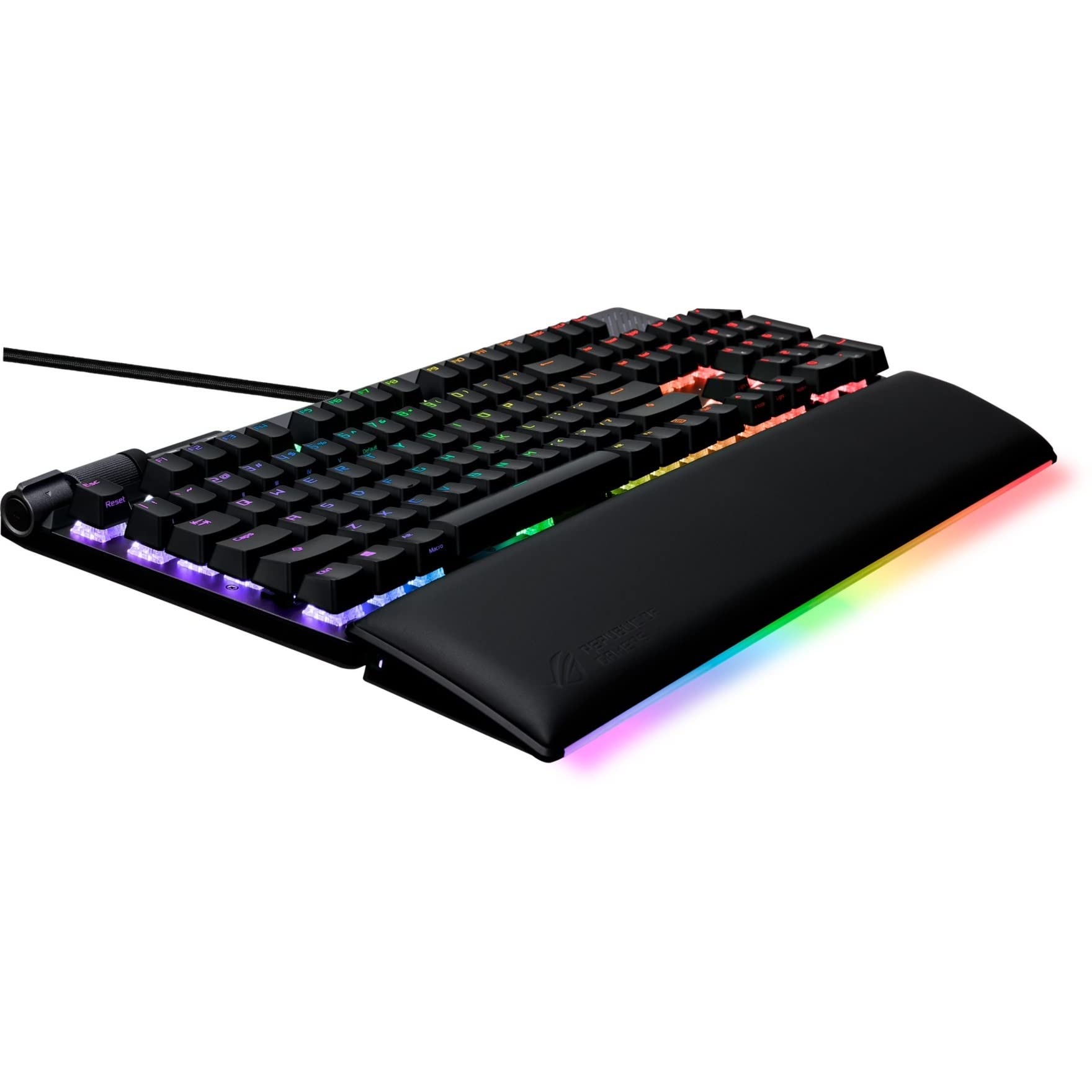
Today I’ll be sharing my review of the ASUS ROG Strix Flare II Animate 100% RGB Gaming Keyboard. As a keyboard connoisseur, I can confidently say that this is the best keyboard I have ever used. I’ve been using a Logitech G910 for the past 7 years, but when it started failing, I decided to give the ASUS ROG Strix Flare II a try.
The first thing that caught my attention was the sleek and clean design of the keyboard. It has an aluminum chassis with a beautiful bluish purpleish gunmetal matte finish and the words REPUBLIC OF GAMERS written on top. The dedicated media and volume controls are conveniently placed at the top-left corner, making it easy to navigate. The AniMe Matrix LED display in the top right corner is a cool feature that allows for customizable images and animations.

Pros and Cons
What We Liked
- The sleek and clean design, with an aluminum chassis and a matte finish
- The AniMe Matrix LED display, which allows for customizable images and animations
- The intuitive controls, with dedicated media and volume controls conveniently placed
- The fast actuation and tactile feel of the ROG NX mechanical switches
- The swappable switches, allowing for a unique and customized typing experience
What Can Be Improved
- The wrist rest could have more padding for added comfort
- The price is on the higher side, but the quality and features justify it
Quick Verdict
The ASUS ROG Strix Flare II Animate 100% RGB Gaming Keyboard is a top-notch keyboard that offers a premium typing experience. The sleek design, customizable LED display, and intuitive controls make it a standout option. The ROG NX mechanical switches provide fast actuation and a satisfying keystroke feel. The only downside is the slightly lacking wrist rest, but overall, this keyboard is worth the investment. If you’re looking for a high-performance gaming keyboard with a unique design, I highly recommend the ASUS ROG Strix Flare II.
You can find the ASUS ROG Strix Flare II Animate 100% RGB Gaming Keyboard on Amazon.
Unboxing – What’s Inside?
I recently purchased the ASUS ROG Strix Flare II Animate 100% RGB Gaming Keyboard from Amazon. Living in the USA, I was excited to receive my new gaming keyboard. The delivery was surprisingly fast, and it arrived within a few days after placing the order.
Inside the box, I found the following items:
- XA07 STRIX FLARE II ANI/NXBN/US/PBT gaming keyboard
- Wrist rest
- ROG keycap puller
- ROG switch puller
- ROG sticker
- Quick start guide
- Warranty booklet
Specifications
Here are the specifications of the ASUS ROG Strix Flare II Animate Gaming Keyboard:
- Style: Gaming
- Keyboard backlighting color support: RGB
- Number of Keys: 38
- Operating System: Windows 7, Windows 10
- Color: NX Brown
- Special Feature: Backlit, Wrist Rest
- Keyboard Description: Gaming
- Connectivity Technology: Wired
- Compatible Devices: Gaming Console
- Brand: ASUS
- Manufacturer: ASUS
- Power Source: USB
- Color: NX Brown
- Item Dimensions LxWxH: 17 x 6 x 2 inches
- Product Dimensions: 17 x 6 x 2 inches
- Item Weight: 2.5 pounds
- Operating System: Windows 7, Windows 10
- Hardware Platform: Laptop, PC
- Item model number: XA07 STRIX FLARE II ANI/NXBN/US/PBT
- Series: XA07 STRIX FLARE II ANI/NXBN/US/PBT
User-Guide
The included documentation, such as the quick start guide and warranty booklet, provided me with useful information about the ASUS ROG Strix Flare II Animate Gaming Keyboard. It helped me understand the different features and functionalities of the keyboard. Additionally, the quick start guide gave step-by-step instructions on how to set up and customize the RGB lighting. If you need more detailed instructions or want to explore advanced features, you can find the complete user guide here.
Features – What We Found
AniMe Matrix LED display
The ASUS ROG Strix Flare II Animate 100% RGB Gaming Keyboard features a unique AniMe Matrix LED display, allowing you to personalize and express yourself through customizable images and animations. This display is positioned at the top section of the keyboard, providing an eye-catching and immersive experience.
You can create your own designs or choose from a variety of preset images and animations to display on the keyboard. Whether you want to show off your gaming team’s logo, your favorite game characters, or simply add some personality to your setup, the AniMe Matrix LED display allows for endless customization options.
Pro-tip: Use the AniMe Matrix LED display to set up custom notifications, such as displaying the health or mana bars of your in-game character, or displaying real-time system information like CPU usage or temperature.
Intuitive controls
The ASUS ROG Strix Flare II Animate Gaming Keyboard is designed with dedicated media and volume controls conveniently placed at the top-left corner of the keyboard. This allows for easy and quick access to media playback, volume adjustment, and even launching specific applications, without having to navigate through complex software menus.
With these intuitive controls, you can seamlessly control your music or video playback, adjust the volume on-the-fly, or even launch your favorite media player with just a press of a button. This feature enhances your overall gaming and multimedia experience, giving you more control and convenience.
Check out the product here.
Almost-instantaneous response
The ASUS ROG Strix Flare II Animate Gaming Keyboard boasts an impressive 8000 Hz polling rate, providing a lightning-fast 0.125 ms response time. This is up to 8 times faster than other leading gaming keyboards, ensuring that every keystroke is registered almost instantaneously.
With such a fast response time, you can enjoy a more responsive and fluid gaming experience. Every key press is accurately detected, allowing you to react quickly in fast-paced games and execute complex keyboard commands with precision.
This feature is particularly beneficial to competitive gamers who rely on fast reflexes and quick actions to gain a competitive edge. It ensures that your inputs are translated into in-game actions without any noticeable delay.
ROG NX mechanical switches
The ASUS ROG Strix Flare II Animate Keyboard is equipped with ROG NX Brown Tactile Switches. These switches offer fast actuation and are designed with ROG-tuned force curves, providing an excellent keystroke feel and feedback.
The fast actuation of the switches ensures that your keystrokes are registered as soon as you press the keys, resulting in quicker response times. The tactile feedback adds a satisfying sensation to your typing or gaming experience, making every keystroke feel more deliberate and precise. Whether you’re typing or gaming, the ROG NX mechanical switches enhance your overall typing speed and accuracy.
Pro-tip: If you prefer a different switch type, the ASUS ROG Strix Flare II Animate Keyboard also allows you to easily swap out the switches for your preferred option. This customization feature allows you to tailor the keyboard’s feel and response to your specific preferences.
Swappable switches
The ASUS ROG Strix Flare II Animate Keyboard offers the convenience of swappable switches. This means you can easily install your preferred switch type for a unique and customized feel.
The swappable switch feature allows you to experiment with different switch types, such as linear, tactile, or clicky switches, to find the one that suits your typing or gaming style best. This level of customization ensures that the keyboard adapts to your preferences and provides the optimal typing or gaming experience.
By allowing you to swap out the switches, ASUS gives you the flexibility to fine-tune your keyboard to match your desired performance and feel. It’s a great feature for those who are particular about their typing or gaming experience and want a keyboard that can be tailored to their preferences.
Our Review, Score and More
Our Score: 95.0
I recently had the opportunity to try out the ASUS ROG Strix Flare II Animate 100% RGB Gaming Keyboard, and I must say, I was thoroughly impressed. From the moment I started using it, I could tell that this keyboard was designed with gamers in mind. The customizable LED display, intuitive controls, and almost-instantaneous response time really set it apart from other gaming keyboards on the market.
The AniMe Matrix LED display is a standout feature for me. Being able to personalize and express myself with customizable images and animations really adds a unique touch to my gaming setup. The dedicated media and volume controls are conveniently placed at the top-left corner of the keyboard, making it easy to adjust settings on the fly without disrupting my gameplay.
One of the things that impressed me the most was the ROG NX mechanical switches. The fast actuation and ROG-tuned force curves provide a great keystroke feel and feedback, enhancing my overall gaming experience. Additionally, the ability to swap out switches for a customized feel is a great feature that not many keyboards offer.
The ASUS ROG Strix Flare II Animate keyboard also excels in terms of build quality and design. The aluminum chassis gives it a premium look and feel, and the built-in sound-dampening foam helps absorb pinging noises and echoes, creating a more immersive gaming experience. The magnetically detachable wrist rest is not only comfortable, but the light diffuser built into it adds a cool visual effect when detached.
Overall, I highly recommend the ASUS ROG Strix Flare II Animate 100% RGB Gaming Keyboard to any gamer or electronics enthusiast. Its impressive features, high-quality construction, and customizable design make it a top choice for those looking to elevate their gaming experience. Check it out here.
Other Options To Go For
When it comes to gaming peripherals, ASUS is a brand that is known for its quality and performance. While the ASUS ROG Strix Flare II Animate 100% RGB Gaming Keyboard is a great choice, there are some alternate products that you should consider. These alternate products offer unique features and advantages that may better suit your gaming needs.
- ASUS ROG Chakram X Origin Gaming Mouse: This gaming mouse offers tri-mode connectivity, allowing you to connect it via 2.4GHz RF, Bluetooth, or wired. With a high DPI sensor and 11 programmable buttons, it provides precise and customizable control. The detachable joystick adds another level of versatility, making it a great choice for gamers who want extra functionality. You can find more information about the ASUS ROG Chakram X Origin Gaming Mouse here.
- ASUS ROG Gladius III Wired Gaming Mouse: If you prefer a wired gaming mouse, the ASUS ROG Gladius III is a fantastic option. It features a 19,000 DPI sensor for accurate tracking, and you can customize the switches to suit your preferences. The ergonomic shape and ROG Omni Mouse Feet ensure comfortable and smooth movement. The Aura Sync RGB lighting adds a stylish touch. You can find more information about the ASUS ROG Gladius III Wired Gaming Mouse here.
- ASUS ROG Claymore II Wireless Modular Gaming Mechanical Keyboard: If customization is your priority, consider the ASUS ROG Claymore II. It features hot-swappable ROG RX Blue switches, allowing you to easily change the switches without soldering. The detachable numpad and wrist rest give you flexibility and comfort. With Aura Sync RGB lighting and media controls, this keyboard provides a seamless gaming experience. You can find more information about the ASUS ROG Claymore II Wireless Modular Gaming Mechanical Keyboard here.
Each of these alternate products offers unique features that may fulfill your specific gaming requirements. Whether you need a versatile mouse, a high-performance wired mouse, or a customizable modular keyboard, these options from ASUS have got you covered. Check them out to elevate your gaming experience!