
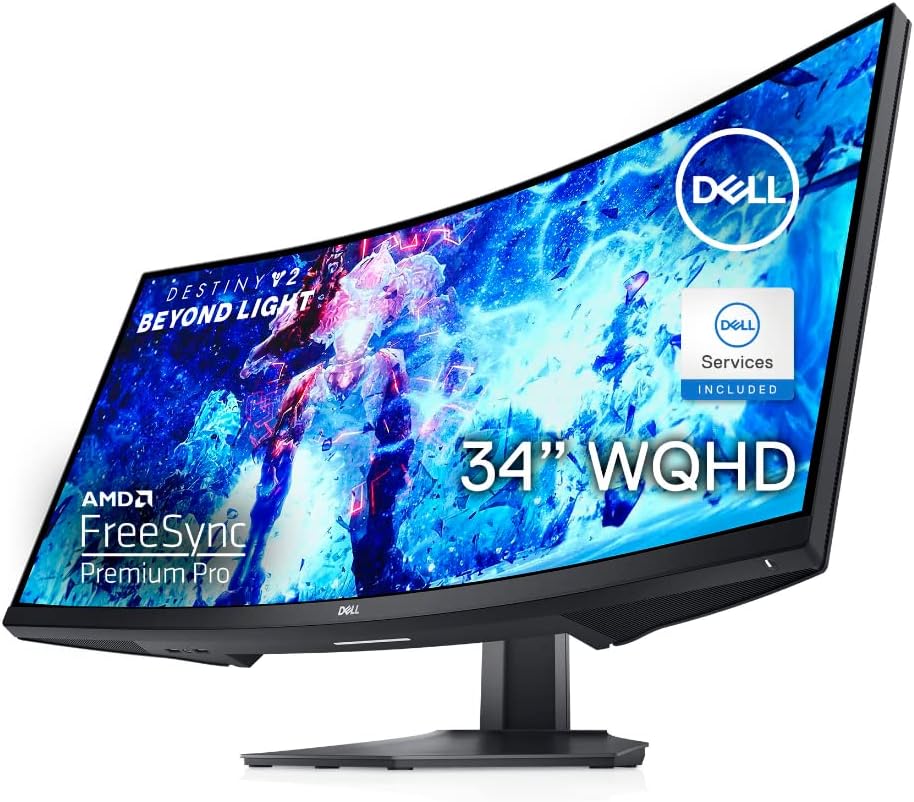
As an avid gamer and multitasker, I was looking for a monitor that could provide an immersive gaming experience while also offering enough screen real estate for productivity tasks. The Dell Curved Gaming monitor met my expectations and more. Its 34-inch size and 21:9 aspect ratio provided a truly immersive gaming experience, allowing me to see more details and enjoy more realistic visuals. The WQHD resolution of 3440 x 1440 on the curved panel was a perfect combination, delivering crisp and sharp images.
One of the standout features of this monitor is its 144Hz refresh rate, which resulted in incredibly smooth and fluid motion. Fast-moving visuals in games were rendered with clarity, allowing for faster reaction times. The AMD FreeSync premium technology also ensured that gameplay remained responsive and stutter-free. I didn’t experience any tearing or flickering while gaming. The monitor also had a slim, tapered stand that provided easy height and tilt adjustability, ensuring a comfortable gaming experience for extended periods.
Pros and Cons
What We Liked
- Immersive 1800R curved display for a truly immersive gaming experience
- WQHD resolution of 3440 x 1440 for crisp and sharp images
- 144Hz refresh rate for smooth and fluid motion
- AMD FreeSync premium technology for responsive and stutter-free gameplay
- Slim and adjustable stand for comfortable gaming sessions
What Can Be Improved
- Viewing angles could be better due to the VA panel technology
- The monitor’s height may be limiting for some users who prefer a taller screen
Quick Verdict
The Dell Curved Gaming monitor is a great choice for gamers looking for an immersive and high-performance display. With its curved design, WQHD resolution, and 144Hz refresh rate, it delivers stunning visuals and smooth gameplay. While the viewing angles and screen height may not be perfect for everyone, the overall experience and features make it a worthy investment for gaming enthusiasts.
Check out the Dell Curved Gaming Monitor on Amazon.
Unboxing – What’s Inside?
I recently purchased the Dell Curved Gaming 34 Inch Monitor with a 144Hz Refresh Rate and WQHD (3440 x 1440) Display from Amazon. As an avid gamer, I was excited to upgrade my gaming setup with this new monitor. I ordered it online and was pleasantly surprised by how fast it was delivered to my doorstep in the USA.
After eagerly unboxing the Dell Curved Gaming Monitor, I found the following items inside the box:
- Monitor Panel
- Stand Riser
- Stand Base
- Power Cable
- DisplayPort to DisplayPort 1.4 Cable
- HDMI 2.0 Cable
- SuperSpeed USB 5 Gbps (USB 3.2 Gen1) Upstream Cable
- Quick Setup Guide
- Safety, Environmental and Regulatory Information
Specifications
Here are the specifications of the Dell Curved Gaming 34 Inch Monitor:
- Brand: Dell
- Display Resolution Maximum: 3440 x 1440
- Screen Size: 34 Inches
- Manufacturer: Dell
- Voltage: 100 Volts (AC)
- Color: Black
- Item Dimensions LxWxH: 9.8 x 31.81 x 20.76 inches
- Product Dimensions: 9.8 x 31.81 x 20.76 inches
- Item Weight: 21.2 pounds
- Item model number: S3422DWG Gaming Monitor – 2NOF4
- Series: Dell 34 Curved Gaming Monitor – S3422DWG
- Number of USB 3.0 Ports: 4
- Max Screen Resolution: 3440 x 1440
- Screen Resolution: 3440×1440
- Standing screen display size: 34 Inches
User-Guide
The included Quick Setup Guide provided helpful instructions on how to set up and connect the monitor to my computer. Additionally, the Safety, Environmental and Regulatory Information helped me understand the important guidelines and certifications related to the product. For more detailed information, I referred to the User Guide available here.
Features – What We Found
Immersive Curved Display
The Dell Curved Gaming Monitor features a 1800R curve, providing a truly immersive gaming experience. This curved display offers more realistic visuals and a comfortable viewing experience with an aspect ratio of 21:9. With a wide viewing angle of 178° (H) / 178° (V), you can see every detail from any position. The monitor has a contrast ratio of 3000:1 (dynamic) and a brightness of 400 cd/m², ensuring vibrant and clear visuals.
Pro-tip: Adjusting the curvature settings can further enhance your gaming experience. Experiment with different curvature levels to find the sweet spot that suits your preference.
High-Quality WQHD Resolution
The Dell Curved Monitor offers a Wide Quad HD (WQHD) resolution of 3440 x 1440 on its 34-inch panel. This higher resolution provides crisp and detailed images, allowing you to see more content on the screen. Whether you’re gaming, watching movies, or working, the high-quality resolution ensures a visually stunning experience.
To learn more about the Dell Curved Gaming Monitor and purchase it, click here.
Smooth and Responsive Gameplay
With a 144Hz refresh rate, the Dell Curved Monitor delivers fast-moving visuals with incredible clarity. This high refresh rate ensures that every frame is displayed smoothly, reducing motion blur and providing a more responsive gaming experience. Whether you’re engaged in fast-paced action or playing competitive games, the 144Hz refresh rate allows you to see every detail and react quickly.
AMD FreeSync Premium Technology
The Dell Curved Gaming Monitor is equipped with AMD FreeSync premium technology, which eliminates screen tearing and stuttering during gameplay. By synchronizing the monitor’s refresh rate with your compatible AMD graphics card, FreeSync ensures a smoother and more immersive gaming experience. Stay engaged in battle with swift and responsive gameplay for a competitive edge.
Pro-tip: Make sure to enable FreeSync in your graphics card settings and check for updates to ensure optimal performance.
Ergonomic Stand with Height and Tilt Adjustability
The Dell Curved Gaming Monitor features a new slim and tapered stand that offers easy height and tilt adjustability. This allows you to find the most comfortable viewing position, reducing strain on your neck and eyes during long gaming sessions. Adjust the height and tilt according to your preference for optimal ergonomics and gaming comfort.
To improve your posture while gaming, keep your monitor at eye level and adjust the tilt to reduce glare and reflections.
Final Thoughts
Our Score: 91.0
I recently purchased the Dell Curved Gaming 34 Inch Monitor and I am extremely happy with my purchase. The immersive experience provided by the curved display and the 144Hz refresh rate is truly remarkable. The WQHD resolution offers crisp and clear visuals, making my gaming and multimedia experiences more enjoyable.
One feature that stood out to me was the AMD FreeSync premium technology, which ensures responsive and stutter-free gameplay. This technology has greatly improved my gaming experience, allowing me to stay engaged and have a competitive edge during gameplay.
Additionally, the adjustable stand with easy height and tilt adjustments has made it comfortable for me to game for extended periods of time. The slim and tapered design of the stand adds a sleek and modern look to my setup.
Overall, I highly recommend the Dell Curved Gaming 34 Inch Monitor. It offers a truly immersive experience, excellent visual quality, and a range of features that enhance the gaming experience. Whether you’re a gamer or someone who enjoys multimedia content, this monitor is definitely worth considering.
Click here to check out the Dell Curved Gaming 34 Inch Monitor on Amazon.
Best combination

If you’re looking to enhance your gaming experience with the Dell Curved Gaming Monitor, I highly recommend considering the IVANKY VESA Certified DisplayPort Cable as an additional purchase. This high-speed DP cable is specifically designed to support 144Hz refresh rate, making it the perfect companion for your gaming monitor.
The IVANKY DisplayPort Cable is VESA certified, ensuring its compatibility and quality. With its gold-plated connectors and braided design, it provides a stable and reliable connection, minimizing signal loss and interference. Whether you’re a competitive gamer or a casual player, the cable’s 4K@60Hz, 2K@165Hz, and 2K@144Hz capabilities will deliver smooth and immersive visuals.
By investing in the IVANKY DisplayPort Cable, you’ll unlock the full potential of your gaming monitor. You’ll experience sharper details, vibrant colors, and fluid motion, elevating your gaming sessions to a whole new level. Not only is it suitable for gaming monitors, but it’s also compatible with graphics cards, TVs, PCs, and laptops, making it a versatile choice for any setup.
Don’t miss out on the incredible visual experience that the Dell Curved Gaming Monitor and the IVANKY VESA Certified DisplayPort Cable can provide together. Upgrade your gaming setup and enjoy a seamless connection and stunning visuals. Enhance your gaming immersion and elevate your performance with this winning combination.
Similar Options
When it comes to gaming monitors, the Dell Curved Gaming, 34 Inch Curved Monitor with 144Hz Refresh Rate, WQHD (3440 x 1440) Display, Black – S3422DWG is a top choice. However, if you’re looking for some alternative options, here are a few great alternatives that you should consider.
- Dell Curved Gaming, 34 Inch Curved Monitor with 144Hz Refresh Rate, WQHD (3440 x 1440) Display, Black – S3422DWG
- Dell has always been a reliable brand when it comes to monitors, and the S3422DWG is no exception. With its immersive curved display and high refresh rate, it offers a great gaming experience. However, if you’re looking for something slightly different, here are some alternatives to consider.
- Dell Curved USB-C Monitor – 34-Inch WQHD (3440×1440) 100Hz
- If you value USB-C connectivity and adjustable features, the Dell S3423DWC is a great alternative. With its sleek silver design and the ability to connect various devices through USB-C, it offers versatility that the S3422DWG may lack. Additionally, the height and tilt adjustable stand allows you to find the perfect viewing angle for long gaming sessions.
- Check it out on Amazon.
- LG UltraWide QHD 34-Inch Curved Computer Monitor 34WQ73A-B
- If you’re a fan of LG monitors, the LG UltraWide 34WQ73A-B is worth considering. With its HDR 10 compatibility and built-in KVM, it offers a high-quality visual experience and convenient switching between multiple input devices. The USB Type-C port is also a handy feature, allowing for easy connectivity and charging.
- Check it out on Amazon.
- SAMSUNG 34 Odyssey G5 Ultra-Wide Gaming Monitor
- If you’re looking for a gaming monitor with a curved screen and a high refresh rate, the SAMSUNG 34 Odyssey G5 is a great alternative. With its 1000R curved screen, 165Hz refresh rate, and 1ms response time, it delivers smooth and immersive gameplay. It also features FreeSync Premium technology for tear-free visuals.
- Check it out on Amazon.
- Sceptre 34-Inch Curved Ultrawide WQHD Monitor
- If you’re on a budget but still want a high-quality gaming experience, the Sceptre C345B-QUT168 is a fantastic option. With its 3440 x 1440 resolution and up to 165Hz refresh rate, it offers sharp visuals and smooth gameplay. The Picture by Picture feature allows you to connect multiple devices, and the 99% sRGB ensures vibrant colors.
- Check it out on Amazon.
These alternatives provide a range of features and price points, ensuring that you can find the perfect gaming monitor to suit your needs and preferences. Whether you prioritize USB-C connectivity, HDR compatibility, or budget-friendly options, there is something for everyone. So why limit yourself to just one option when you can explore these alternatives and find the perfect gaming monitor for you?